Defining an Agent
Create a reusable Agent configuration for a self-hosted runtime.
An Agent runs an installed Agent program with a model, system prompt, extensions, and RuntimeProfile. Multiple Sessions can share one Agent. Saving an Agent does not interrupt work already in progress; AstraBox resolves the latest saved Agent and RuntimeProfile when it first prepares or rebuilds a Session runtime.
Share an Agent
Click an Agent's name in the home catalog to open its detail page, then choose
Copy link. The stable /agents/{agent_id} link shows the Agent's introduction,
tags and model. A recipient signs in when required and returns to that Agent;
Start conversation creates their own new conversation with it. Opening or
reloading the link does not create a conversation. The link grants no additional
access, and disabled or inaccessible Agents show an unavailable page.
Archive an Agent
Open the Agent in management and choose Archive agent. Archiving uses the
Agent deletion operation: it removes the Agent from business and management
lists, stops its triggers, and retires prepared capacity. Its definition stays
in the database as DELETED; conversation history remains readable. There
is no restore operation. Disabling an Agent is reversible and keeps it in
management.
View and export Agent conversations
Open Console > Sessions to see the conversations for every Agent you manage as creator or assigned administrator. Managing three Agents includes all three in this page. Select an Agent or date range to narrow the list, then choose Export transcripts to download the matching native transcripts together. The server applies the same Agent permissions to the list, conversation detail, and export; public use access alone does not grant access to other users' logs. Instance-wide administration remains restricted to platform administrators.
Core elements
You can think of an Agent as a "job description":
| Element | Description |
|---|---|
| model | The Agent's intelligence level |
| system prompt | The Agent's behavioral guidelines |
| MCP servers | External services the Agent can call |
| Skills and Plugins | Reusable procedures and packaged extensions the Agent can use |
The Agent executes tasks inside a Session. AstraBox keeps the Agent available, starts or reuses its sandbox, streams progress, and stores the Session outside the sandbox.
Field reference
| Parameter | Type | Required | Description |
|---|---|---|---|
agent_id | string | — | System-generated Agent ID. |
name | string | Yes | The Agent name. |
description | string | No | A description for the Agent. |
use_cases | array | No | Short examples of work this Agent handles. |
display_meta | object | No | display_name, icon and tags. Tags are searched and shown on the Agent's card on the home page, where clicking one filters by it: at most five, stored lower case with a leading # dropped and spaces turned into -. |
categories | array | No | Ids of the categories the Agent is listed under on the home page, from those an administrator defines (GET /api/v1/agent-categories). An unknown id is refused. |
model | string | Yes | The model identifier. See details below. |
system | string | No | The system prompt. |
engine_options | object | No | Advanced options defined by the Agent program selected through the RuntimeProfile. |
skills | array | No | Skill sources loaded into the Session sandbox. |
mcp_servers | object | No | MCP server configurations, keyed by server name. |
artifacts_enabled | boolean | No | Whether the Agent's conversations receive the built-in artifacts tools. Omitted on create, it is true; see Artifacts. |
default_repo | object | No | The source repository cloned for each new Session. |
packages | array | No | Engine-native packages and the reviewed revisions to install. Each names a kind the RuntimeProfile's engine declares, such as claude-plugin for a Claude Code plugin repository. |
runtime_profile_name | string | Yes | The RuntimeProfile that supplies the Agent program, sandbox, network policy, and model connection. |
exposure_mode | string | No | Where the Agent is available: chat_only, mcp_only, or both. |
idle_hibernate_seconds | integer | No | How long the Session runtime may remain idle before the RuntimeProfile's pause or removal behavior applies. |
prepared_capacity | integer | No | How many new conversations can start at the same moment on a prepared runtime, from 0 to 1000; 0 turns prewarming off. Omitted on create, it is 1 where the deployment can prewarm and 0 where it cannot; see Prewarming. |
enabled | boolean | No | Whether the Agent can start new Sessions. Disabled Agents are hidden from the user-facing picker and retained in management. |
visibility | string | — | Agent authorization mode: public, private, or allowlist. Managed through the Agent access endpoint. |
admins | array | — | Accounts allowed to manage the Agent. Managed through the Agent access endpoint. |
allowed_user_ids | array | — | Accounts allowed by allowlist authorization. Managed through the Agent access endpoint. |
version | integer | — | The optimistic-concurrency revision. It starts at 1 and increments when a setting that affects the Agent runtime changes. |
state | string | — | The Agent lifecycle state. |
created_at | string | — | The creation timestamp in ISO 8601 format. |
updated_at | string | — | When the Agent's settings, access or credential bindings last changed. Runtime state the platform keeps on the Agent does not move it, and saving unchanged settings does not either. |
model
The model field specifies the model that the Agent uses. AstraBox passes this identifier to the model endpoint configured by the selected RuntimeProfile:
| Value | Description |
|---|---|
The value configured by ANTHROPIC_MODEL | The model served by the bundled Anthropic-compatible route. |
| Any model ID served by the selected endpoint | A model exposed by an external LiteLLM gateway, OpenAI-compatible endpoint, or local model service. |
A self-hosted deployment is not limited to a fixed vendor catalog. See Connect a model service for endpoint and credential configuration.
Native runtime JSON
Select the RuntimeProfile first: its engine declares which JSON blocks the Agent can override. Each editor identifies the native target and its merge rules. The platform validates block names, JSON object shape and platform-managed keys, not a catalog of vendor options inside each block. The installed runtime interprets those options; unknown fields follow that supplier's behavior. The engine adapter passes configuration to that program's native files or API. Assign credentials through the managed model connection and Credential Vault; credential values are not runtime JSON overrides.
| Engine | engine_options block | Native target |
|---|---|---|
| Claude Code | sdk_options | ClaudeAgentOptions; nested settings is serialized for CLI --settings. |
| Codex | config | thread/start and thread/resume configuration overrides. |
| Codex | turn_start | Each turn/start parameters object. |
| Codex | model_catalog | The complete native models.json object. |
| Pi | settings | The conversation's ~/.pi/agent/settings.json root. |
| DeepSeek Harness | session_create | Native session/create request parameters, including agentPreset. |
Enter {} to supply an empty native object, or leave an editor blank to remove
that block. Runtime JSON and model-gateway
configuration serve different purposes; both remain available. The Model
field links to the configured LiteLLM management page when the deployment
provides one. Session identity, transport and assigned model credentials remain
platform-managed rather than arbitrary JSON overrides.
MCP servers, Skills, and Plugins
The selected Agent program supplies its own native tools, such as reading files, editing code, and running commands. AstraBox does not redefine those tools. Agent configuration adds MCP servers, Skills, and Plugins in the native formats supported by that program. In Console > Agents, open an Agent to select administrator-managed remote MCP servers and Skills, or add a Plugin repository directly to the Agent.
For more configurations, see MCP servers, Skills, and Plugins.
Connectors
The Connectors card on an Agent's management page offers work apps such as Gmail or Notion to the Agent's callers. Each person who starts a conversation with the Agent uses their own sign-in, which they connect on the Connections page. When a person who has not connected the app asks for it, the agent is told so and can show them a card to connect it. Conversations a channel, schedule or webhook starts have no such person and are offered no connectors. A connector is an MCP server named after the app, so it cannot share a name with one of the Agent's own MCP servers. See Connect work apps for how connectors work and how an administrator sets them up.
Managing Agents
The web console covers the following common workflows. For programmatic management, see the HTTP API.
Create
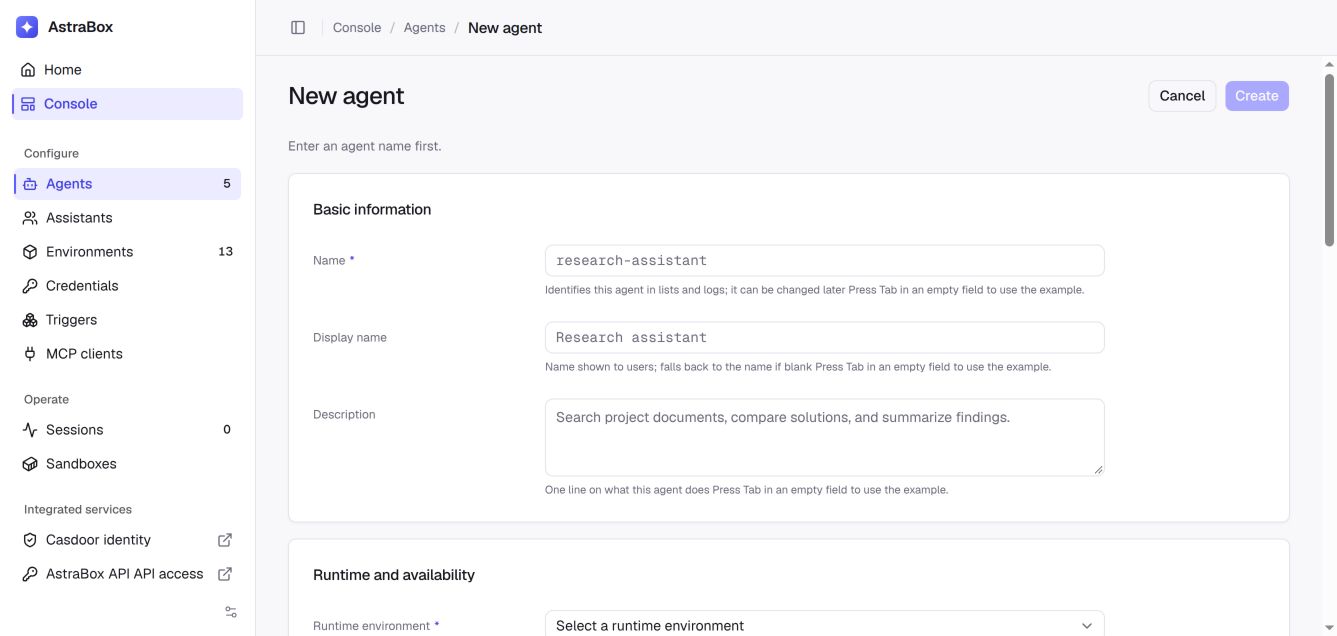
Open Console > Agents, click New agent, then enter a name, RuntimeProfile, and model. The system prompt and every extension are optional. Click Create when the Agent has the capabilities it needs.
Prewarming
Prewarming prepares a runtime before the next Session needs it. The Agent configuration, configured Skills and Plugins, and engine startup are completed before the runtime is offered for use, so a new conversation claims a running sandbox instead of starting one. The Agent's Prewarm status reports whether prepared capacity is ready or preparation failed.
Prepared capacity (prepared_capacity) is how many new conversations can
start at the same moment without waiting, from 0 to 1000. A new Agent gets 1
wherever its sandbox service can run its pool of prepared sandboxes; for the
built-in OpenSandbox service that means ASTRABOX_AGENT_PREWARM_REDIS_URL is
set, which every bundled Compose deployment does. Elsewhere a new Agent gets 0,
and a capacity above 0 is refused when the Agent is saved, because nothing
could be prepared for it. The value is stored on the Agent when it is created
and the create form starts from it; changing the deployment later does not
change an existing Agent's value.
Each unit of capacity is one prepared runtime waiting for a conversation: a whole idle sandbox when each conversation gets its own, or a seat (a started, isolated engine) inside a sandbox when the Agent's conversations share one. A shared sandbox is prepared with as many seats as its memory admits, and AstraBox keeps enough idle sandboxes to hold the capacity in seats; the first conversation that takes such a sandbox leaves its other seats to the next conversations. When a conversation takes an idle sandbox, AstraBox prepares a replacement within seconds. Once every unit is taken, further conversations start their runtime first, which takes several seconds, until capacity refills; the Agent's Prepared capacity card shows the last time that happened. Set the value to the number of conversations you expect to start at the same time. Changing it takes effect without discarding the units already prepared.
Prepared capacity holds resources for as long as it is above 0 and the Agent
and its RuntimeProfile are enabled. What one unit costs on each deployment is in
Plan capacity for prepared sandboxes.
To turn prewarming off for one Agent, set Prepared capacity to 0 (under the
advanced settings when creating the Agent, or in Runtime and availability
on its page), or send "prepared_capacity": 0 when creating or updating it.
Read
Open Console > Agents to list the Agents available to your account. Select an Agent to view its model, RuntimeProfile, and capabilities. If you are allowed to manage it, the page also shows editable configuration and authorization settings.
Update
Open the Agent, edit the relevant section, then click Save on that section. The console includes the current version so a concurrent edit produces a conflict instead of silently replacing another user's changes. Saving does not reconfigure a task already running; the latest settings are used when AstraBox first prepares or rebuilds a Session runtime.
To fetch Skills and Plugins again using the saved configuration, select Reprepare in Prewarm status. Save or revert pending edits first. This replaces prepared capacity that has not been claimed by a Session; existing Sessions keep their running sandboxes. A repository pinned to a commit keeps that commit until its configured revision changes.
Delete
Delete is currently available through DELETE /api/v1/agents/{agent_id}. Deleting an Agent removes it from further use and starts releasing runtime resources it owns. Existing Session records and transcripts remain, but a Session cannot start or rebuild its runtime after the Agent it references has been deleted.
Versioning
The Agent API uses optimistic concurrency control (OCC):
- The
versionstarts from1upon creation. - After a successful update to a runtime field, the
versionis automatically incremented by 1. - An update may include the current
version. If it does not match the server-side version, AstraBox returns 409AGENT_VERSION_CONFLICT. - An update without
versionis allowed, but a concurrent write detected while it is being applied still returns 409.
This prevents concurrent modifications from overwriting each other.
Handling 409
If your request fails because the version is outdated, you receive an error like this:
{
  "code": "AGENT_VERSION_CONFLICT",
  "message": "agent version mismatch: supplied 1, stored 2",
  "data": null
}
To resolve the conflict:
GETthe latest Agent to retrieve the currentversion- Re-apply your desired changes to the latest object data.
- Use the new
versionto perform anotherPUT.
Best practices
- Naming conventions — Use the
team-purposeformat, such asbackend-code-review,frontend-test-gen. - Prompt refinement — Specify the role, output format, and constraints in the
systemfield. - Apply the principle of least privilege — Add only the MCP servers, Skills, Plugins, repositories, credentials, and network destinations required for the Agent's work.
- Help users find the Agent — Give it a clear description, the categories it belongs under, and tags for the words people will search for.
- Use version checks for automated updates — Include the version when a service edits an Agent so concurrent changes produce a conflict instead of replacing one another.
See Multiagent orchestration when the installed Agent program should divide work among child runs.
FAQ
Q: How does an Agent's network policy interact with extensions and credentials?
A: Use networking.type: unrestricted for open internet access. limited admits
the listed hosts plus destinations AstraBox can derive for the model, platform
callbacks, and Plugin repositories; remote Agent MCP servers are admitted only
when allow_mcp_servers is true. Hosts from the Agent's own Skills, Plugins
and MCP servers are admitted only when they are public or already listed; see
What an Agent's own extensions may reach.
Credential Vault assignments leave the RuntimeProfile record unchanged; their
binding hosts are added to the effective sandbox policy.
Q: Does updating an Agent affect currently running Sessions?
A: Saving does not interrupt work already executing. A Session keeps using its current runtime until AstraBox has to prepare or rebuild it; that preparation resolves the latest saved Agent and RuntimeProfile.
Q: Can the MCP server, Skill, and Plugin lists be empty?
A: Yes. The Agent program retains its native capabilities. Add extensions only when the Agent needs external services, reusable procedures, or packaged commands.
Q: Is there a length limit for the name field?
A: AstraBox does not impose a fixed length limit. Use a concise name that people can recognize in the console and integrations.
Q: How do I restore an earlier Agent configuration?
A: AstraBox does not keep selectable configuration history. Save the Agent configuration before updating it. To restore it, PUT the saved configuration with the latest version number.
Next steps
- RuntimeProfile — Configure where the Agent runs.
- Start a Session — Create a Session with an Agent.
- MCP servers, Skills, and Plugins — Configure extensions and credentials.
- Multiagent orchestration — Inspect and control delegated child runs.